Quick Build & Economics Summary
| Component / Spec | Exact Model / Selection | Key Metric / Economics |
|---|---|---|
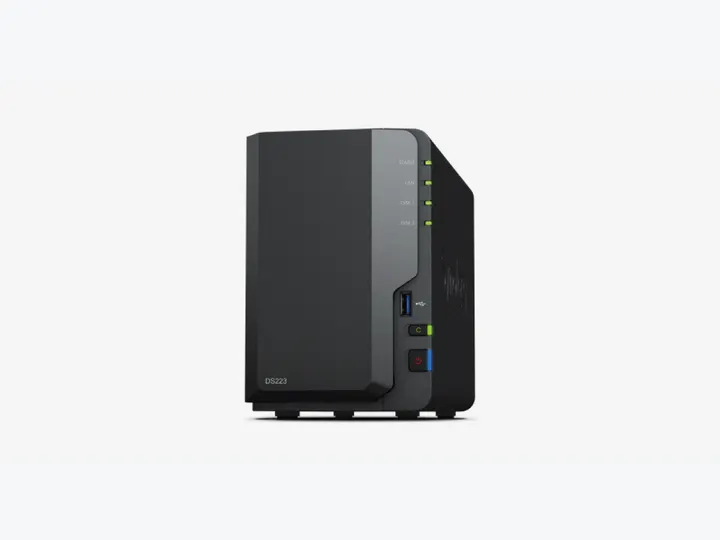
| Recommended NAS | DS223 (2 Bays · 1 × 1GbE) | Realtek RTD1619B · 4-core · 2GB RAM |
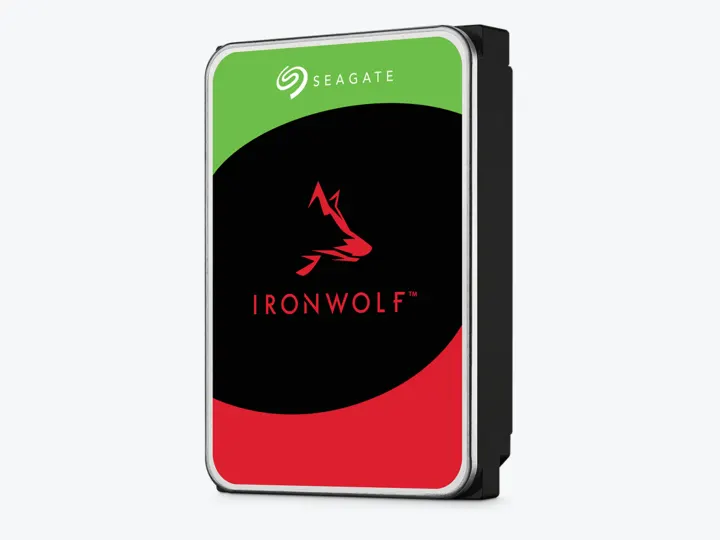
| Selected Hard Drives | 2 × 4TB (ST4000VN006) | CMR CMR · 5,400 rpm |
| Planning Capacity | 4TB usable | The mirror can continue after one drive fails; RAID is not a backup. |
| Historical price estimate | DS223 + 2 × ST4000VN006: $634.97 estimated total | $158.74 / usable TB |
Who this build is for
- Households with less than roughly 2.5TB of current data and moderate growth
- Buyers who value simple scheduled backup and snapshots over app-server performance
- A NAS placed near living space where two lower-speed disks are preferable to a large multi-drive array
Why this NAS and tier win
DS223 is not the fastest two-bay NAS, which is precisely why it belongs in the entry backup tier. Its fixed 2GB memory and 1GbE port are adequate for scheduled computer backup, phone uploads, file history, and restores. TechRadar reached the same basic trade-off: DSM and low operating complexity are the strengths, while raw hardware value and small-file performance are the compromises. [1][2]
The recommendation is based on the backup stack rather than RAID alone. Hyper Backup can create versioned copies to USB, another NAS, or supported cloud destinations. A mirror helps the system stay available after one disk fails, but it cannot recover files after theft, fire, enclosure failure, or every ransomware event. [3][4]
Why these exact drives
The exact ST4000VN006 is a current 4TB CMR IronWolf model in the catalog. Two disks create a simple mirror with 4TB decimal usable before formatting. This capacity is intentionally modest: it keeps the entry total controlled and makes the recommendation honest for documents, photos, and ordinary household-device backups. [5]
A measured 4TB comparison found that family labels alone do not settle noise, power, or value. The selected IronWolf is therefore an exact MPN, not a generic promise that every IronWolf is quieter or more reliable than every WD Red. [6]
Capacity and protection plan
2 equal 4TB drives with 1 drive-equivalent reserved for redundancy produce an editorial planning estimate of 4TB decimal usable before formatting, filesystem metadata, snapshots, applications, and free-space reserve.
The mirror can continue after one drive fails; RAID is not a backup. Reconfirm the RAID/SHR/RAIDZ behavior for the exact operating system and chosen disk layout before initialization.
What YouTube and community evidence change
In Synology community comparisons, DS223 is repeatedly treated as sufficient for backup and file storage, while DS225+ is recommended when 2.5GbE, containers, or longer performance headroom justify the extra cost. That is a useful boundary: entry should not quietly become a midrange purchase. [7]
Backup-focused YouTube guidance consistently separates snapshots, synchronization, and a second backup destination. The popular SpaceRex overview is commercially affiliated but useful because it compares the workflows instead of claiming that one RAID array is complete protection. [4]
Trade-offs before buying
Recommended setup sequence
- 1Measure current data across every computer, phone, and loose external drive.
- 2Create an SHR/RAID1-style mirror and enable Btrfs snapshots for protected shares.
- 3Assign each computer its own backup job and quota rather than copying files manually.
- 4Add a versioned USB or encrypted off-site target before calling the system complete.
- 5Run a test restore, record the steps, and repeat the test at least quarterly.
Alternatives worth considering
Worth the extra cost when large restores, phone-photo indexing, or light containers are already part of the plan.
Choose ASUSTOR for lower hardware costAS1202TFaster networking and good value, but the independent consensus around beginner backup administration is weaker than DSM.
Frequently asked questions
Is 4TB enough for home backup?
It is enough when current protected data is well below 3TB and growth is moderate. Add every device, include version history, reserve about 20%, and choose a larger tier if the result is close to 4TB.
Does RAID1 mean the files are backed up?
No. RAID1 keeps the NAS available after one disk fails. It mirrors deletion, corruption, and many ransomware changes, so an independent versioned copy is still required.
Should I buy DS225+ instead of DS223?
Choose DS225+ when 2.5GbE, Synology Photos indexing, or light Docker app hosting is already planned. For scheduled household computer backups alone, DS223 keeps the entry budget focused without paying for unused compute.
Can I mix different hard drive brands or capacities in DS223?
Under Synology SHR, you can mix capacities later, but in a 2-bay mirror, the total usable storage is strictly limited to the capacity of the smallest drive.
Sources and evidence boundary
This article synthesizes official product facts, independent reviews, YouTube material, and community discussion. YouTube view/like/comment counts are a dated engagement signal, not a quality score. Community posts are anecdotal and cannot establish failure rates. Reviewers may use affiliate links; one publisher’s article and companion video count as one editorial viewpoint.
Synology · accessed Aug 31, 2026. Two SATA bays, Btrfs and DSM backup/photo workflows on a fixed-memory 1GbE platform.
TechRadar · Dec 9, 2024 · accessed Aug 31, 2026. Praises DSM's balance of function and ease while criticizing value and small-file performance.
Synology · accessed Aug 31, 2026. Versioned backup from a Synology NAS to local, remote and cloud destinations.
SpaceRex · Sep 21, 2022 · accessed Aug 31, 2026. Long-form comparison of Hyper Backup, snapshots, Active Backup, USB Copy and synchronization; affiliate links are disclosed.
Engagement at capture: 197,307 views; 3,562 likes; 254 comments at capture.
Seagate · accessed Aug 31, 2026. NAS-oriented CMR family; exact 4TB and 12TB MPN facts are stored in the ChooseCompute catalog.
SomeTechGuy · Jun 14, 2025 · accessed Aug 31, 2026. Measured 4TB performance, noise and power comparison across the four NAS HDD families; affiliate links are disclosed.
Engagement at capture: 54,339 views; 1,522 likes; 166 comments at capture.
Reddit r/synology · accessed Aug 31, 2026. Community trade-off between a sufficient DS223 backup appliance and paying for DS225+ network/compute headroom.