Quick Build & Economics Summary
| Component / Spec | Exact Model / Selection | Key Metric / Economics |
|---|---|---|
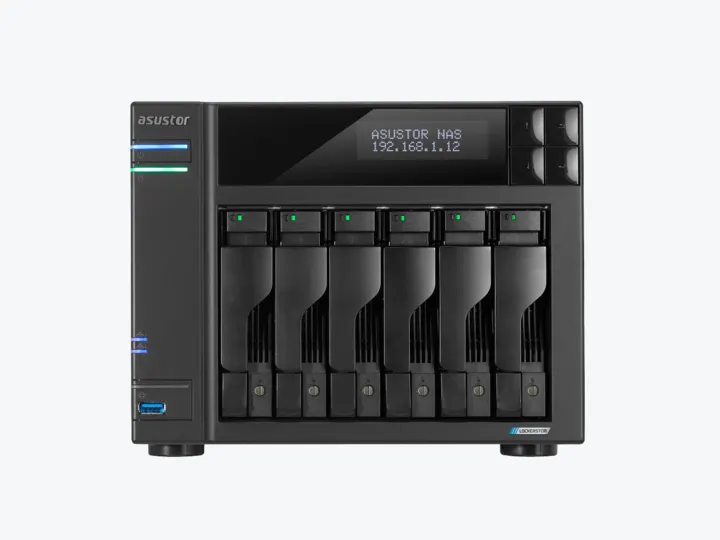
| Recommended NAS | AS6706T v2 (6 Bays · 2 × 5GbE) | Intel Celeron N5105 · 4-core · 8GB RAM |
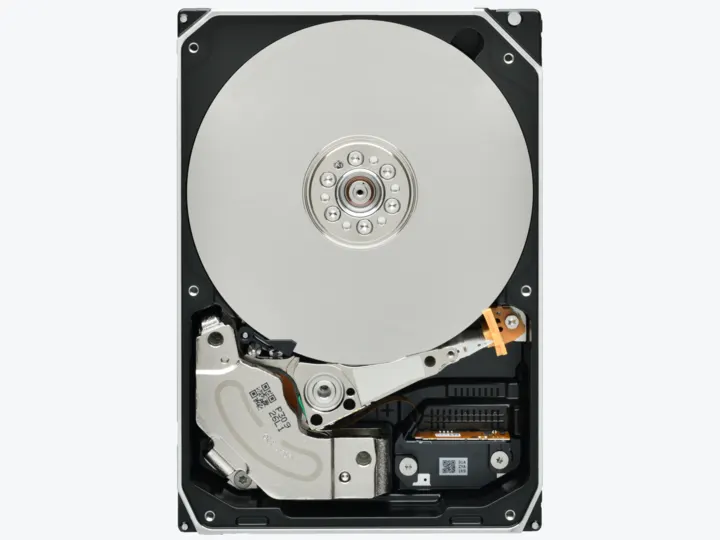
| Selected Hard Drives | 6 × 16TB (HDWG51GXZSTB) | CMR CMR · 7,200 rpm |
| Planning Capacity | 64TB usable | The array can continue after two drives fail; protect Plex metadata and personal media with a separate backup. |
| Price estimate — recheck required | AS6706T v2 + 6 × HDWG51GXZSTB: $5,071.93 estimated total | $79.25 / usable TB |
Who this build is for
- Large remux libraries needing more than four HDD bays
- Mostly Direct Play households with occasional supported hardware conversion
- Owners willing to pay for dual parity and place six disks away from the viewing room
Why this NAS and tier win
AS6706T v2 provides six bays, Intel N5105 graphics, 8GB memory, dual 5GbE, and four M.2 slots. Guru3D evaluates the exact v2 model favorably for advanced home/creator use, providing an independent counterweight to vendor specifications. [1][2]
LockerStor Gen2 Plex testing demonstrates the platform’s media path, while Plex documentation defines the limits: hardware acceleration requires Plex Pass and results remain format dependent. The test publisher discloses affiliate relationships and is counted as one source cluster. [3][4][5]
Why these exact drives
Six exact 16TB N300 Pro drives under dual parity provide four drive-equivalents, or about 64TB usable. The Pro workload and warranty positioning is proportionate to a large always-on six-bay array. [6]
The earlier 20TB IronWolf Pro proposal cost substantially more in the static catalog without a demonstrated 80TB need. The 16TB Toshiba option improves tier value while preserving dual parity. [6]
Capacity and protection plan
6 equal 16TB drives with 2 drive-equivalents reserved for redundancy produce an editorial planning estimate of 64TB decimal usable before formatting, filesystem metadata, snapshots, applications, and free-space reserve.
The array can continue after two drives fail; protect Plex metadata and personal media with a separate backup. Reconfirm the RAID/SHR/RAIDZ behavior for the exact operating system and chosen disk layout before initialization.
What YouTube and community evidence change
Plex and ASUSTOR community recommendations support Lockerstor Gen2 as a strong prebuilt all-in-one NAS, but some experienced users still prefer separating a small Intel compute node from bulk storage for easier upgrades. [7]
Community subtitle discussions are a useful warning against quoting a guaranteed stream count. PGS burn-in can force a difficult conversion path despite Quick Sync. [8]
Trade-offs before buying
Recommended setup sequence
- 1Confirm the library truly needs more than four bays.
- 2Use RAID6/dual parity and reserve free space for metadata and growth.
- 3Place the chassis in a ventilated location away from seating.
- 4Test the hardest HDR, subtitle, audio, and remote-playback files.
- 5Back up Plex metadata and personal content independently from the array.
Alternatives worth considering
Frequently asked questions
Is the Intel Celeron N5105 still sufficient for 4K Plex streaming in 2026?
Yes. The Intel N5105 includes Intel UHD Graphics with Quick Sync, capable of hardware transcoding multiple 1080p and 4K streams. However, for massive multi-user transcoding fleets, a dedicated Mini PC compute node is more modular.
Why use six 16TB drives instead of larger 20TB drives?
Six 16TB drives hit a much better market price-per-TB sweet spot while delivering ~64TB usable under dual-parity RAID 6, avoiding the steep price premium of 20TB+ enterprise drives.
What is the benefit of four M.2 NVMe slots on the AS6706T v2?
The four M.2 slots can be configured as a fast read/write cache for Plex database and poster metadata, or as an independent high-speed all-flash storage volume for Docker containers.
Does ASUSTOR ADM support automatic Plex updates?
Yes. ADM includes a first-party App Central package for Plex Media Server, or you can run the official Plex container via Docker / Portainer for instant upstream updates.
Sources and evidence boundary
This article synthesizes official product facts, independent reviews, YouTube material, and community discussion. YouTube view/like/comment counts are a dated engagement signal, not a quality score. Community posts are anecdotal and cannot establish failure rates. Reviewers may use affiliate links; one publisher’s article and companion video count as one editorial viewpoint.
ASUSTOR · accessed Aug 31, 2026. Six bays, Intel N5105, 8GB memory, dual 5GbE and four M.2 slots.
Guru3D · accessed Aug 31, 2026. Favorable assessment for advanced home users and creators needing six bays and multi-gigabit networking.
NASCompares · Feb 5, 2023 · accessed Aug 31, 2026. Plex test on the Lockerstor Gen2 platform; Plex Pass and affiliate relationships are disclosed.
Engagement at capture: 17,242 views; 199 likes; 31 comments at capture.
Plex Support · accessed Aug 31, 2026. Hardware-accelerated streaming requires Plex Pass and remains codec/platform dependent.
Plex Support · accessed Aug 31, 2026. HDR-to-SDR conversion support varies by server platform and hardware path.
Toshiba · accessed Aug 31, 2026. CMR NAS drive family positioned for heavier workloads, up to 550TB/year and five-year warranty.
Reddit r/PleX · accessed Aug 31, 2026. Community recommendation signal for six-bay Lockerstor hardware and Quick Sync, balanced against separating compute from storage.
Reddit r/PleX · accessed Aug 31, 2026. Discussion illustrates that subtitle burn-in can become the limiting Plex path even when Quick Sync exists.