Quick Build & Economics Summary
| Component / Spec | Exact Model / Selection | Key Metric / Economics |
|---|---|---|
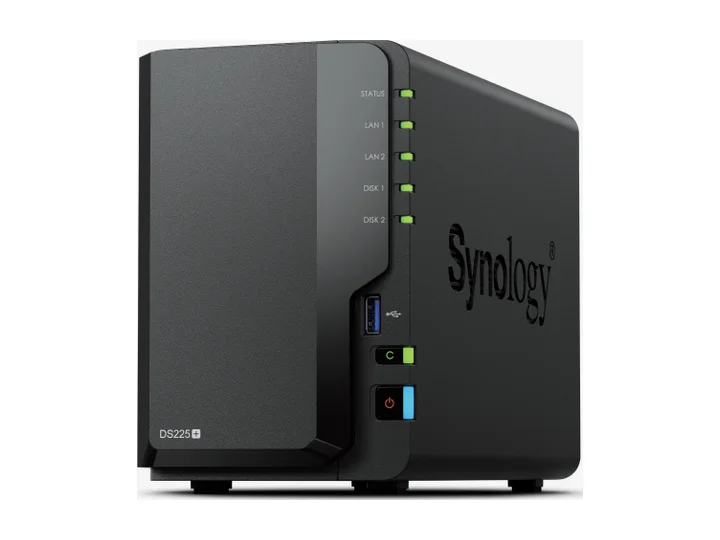
| Recommended NAS | DS225+ (2 Bays · 1 × 2.5GbE + 1 × 1GbE) | Intel Celeron J4125 · 4-core · 2GB RAM |
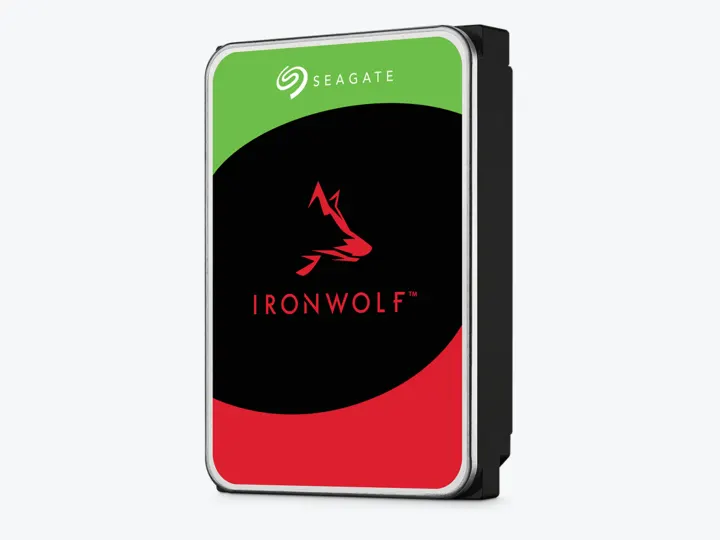
| Selected Hard Drives | 2 × 4TB (ST4000VN006) | CMR CMR · 5,400 rpm |
| Planning Capacity | 4TB usable | The mirror can continue after one drive fails; keep a second copy of originals outside the NAS. |
| Historical price estimate | DS225+ + 2 × ST4000VN006: $744.97 estimated total | $186.24 / usable TB |
Who this build is for
- Roughly two to five people working mainly with documents and moderate media
- Teams with less than about 2.5TB current protected data
- An office that can assign one person to updates, alerts, and restore tests
Why this NAS and tier win
DS225+ brings 2.5GbE to a compact DSM appliance. Active Backup, Hyper Backup, users/groups, Btrfs snapshots, and mature clients are the reasons to choose it; Android Central’s long-term review likewise makes software the central recommendation while noting limited base memory. [1][2][3][4]
The build intentionally avoids enterprise language. One two-bay appliance is not high availability, and a three-year hardware warranty is not a guaranteed software-support date. [1]
Why these exact drives
Two exact 4TB CMR IronWolf drives form a simple mirror with about 4TB decimal usable. The lower-speed 4TB model is a better desk-adjacent entry choice than a stack of high-capacity Pro drives. [5][6]
Both bays are occupied. Capacity planning must include endpoint versions, snapshots, and free-space reserve, not just current shared-folder size. [2]
Capacity and protection plan
2 equal 4TB drives with 1 drive-equivalent reserved for redundancy produce an editorial planning estimate of 4TB decimal usable before formatting, filesystem metadata, snapshots, applications, and free-space reserve.
The mirror can continue after one drive fails; keep a second copy of originals outside the NAS. Reconfirm the RAID/SHR/RAIDZ behavior for the exact operating system and chosen disk layout before initialization.
What YouTube and community evidence change
Small-business community advice favors Synology when predictable administration matters, but repeatedly warns that the NAS is not the only backup. That is the core of this entry choice. [7]
Backup education videos distinguish synchronization, snapshots, endpoint backup, and off-site backup. The source discloses affiliate links and is used for workflow explanation rather than product ranking. [8]
Trade-offs before buying
Recommended setup sequence
- 1Create named users and least-privilege groups; never share the administrator account.
- 2Set separate shares and quotas for departments or projects.
- 3Enable snapshots and endpoint backups with documented retention.
- 4Send versioned backup to encrypted cloud or a second-site target.
- 5Connect a UPS and conduct quarterly restore drills.
Alternatives worth considering
Frequently asked questions
Can Synology DS225+ back up all office Windows and Mac computers automatically?
Yes. Synology Active Backup for Business is completely license-free and allows scheduled bare-metal, system-state, and file-level backups for all office PCs and Macs with global data deduplication.
How many concurrent office users can the DS225+ handle?
For standard SMB document sharing, Excel sheets, and background backups, it comfortably supports 5 to 10 concurrent office staff. For heavy concurrent multi-user database operations, a 4-bay model with more RAM is recommended.
Does Btrfs protect office files against accidental deletion and ransomware?
Configured snapshots can recover file versions within their retention window. Immutable retention is a separate model- and software-dependent feature; Btrfs alone does not provide it. Test recovery permissions and timing, and keep an independent off-site or offline backup.
What is the 3-2-1 backup strategy for small offices?
Keep 3 copies of important company data, on 2 different media types (e.g. NAS array + external USB drive), with 1 copy stored securely off-site (e.g. encrypted cloud via Synology C2 / Hyper Backup).
Sources and evidence boundary
This article synthesizes official product facts, independent reviews, YouTube material, and community discussion. YouTube view/like/comment counts are a dated engagement signal, not a quality score. Community posts are anecdotal and cannot establish failure rates. Reviewers may use affiliate links; one publisher’s article and companion video count as one editorial viewpoint.
Synology · accessed Aug 31, 2026. Two bays, Intel J4125, 2.5GbE and DSM software support.
Synology · accessed Aug 31, 2026. Centralized endpoint and workload backup capabilities relevant to small teams.
Synology · accessed Aug 31, 2026. Versioned backup from a Synology NAS to local, remote and cloud destinations.
Android Central · Aug 25, 2026 · accessed Aug 31, 2026. Calls DSM the main reason to buy, notes useful 2.5GbE, limited base memory and restored third-party SATA drive use under DSM 7.3.
Seagate · accessed Aug 31, 2026. NAS-oriented CMR family; exact 4TB and 12TB MPN facts are stored in the ChooseCompute catalog.
SomeTechGuy · Jun 14, 2025 · accessed Aug 31, 2026. Measured 4TB performance, noise and power comparison across the four NAS HDD families; affiliate links are disclosed.
Engagement at capture: 54,339 views; 1,522 likes; 166 comments at capture.
Reddit r/synology · accessed Aug 31, 2026. Community discussion emphasizes simple administration, permissions, off-site copies and restore planning over raw hardware.
SpaceRex · Sep 21, 2022 · accessed Aug 31, 2026. Long-form comparison of Hyper Backup, snapshots, Active Backup, USB Copy and synchronization; affiliate links are disclosed.
Engagement at capture: 197,307 views; 3,562 likes; 254 comments at capture.